How I Test Whether AI Crawlers Can Access a Website

By Nitish Kumar Yadav, founder of FixAEO
Last verified: August 15, 2026
I used to treat robots.txt as a yes-or-no test. If the crawler was not blocked, the site was crawlable.
That answer is incomplete.
A request can pass the robots rule and then get rejected by Cloudflare, sent into a redirect loop, served a JavaScript challenge, or handed an HTML shell with none of the page's useful text. A copied user-agent can also make a local test look convincing even though it says nothing about whether the real provider visited.
Here is the process I now use. It starts with policy, moves through the request path, and ends with logs.
Disclosure: I founded FixAEO, a product that checks how AI search engines access and represent websites. This article includes first-party links to my author profile, a background guide, and an optional audit tool. They are not affiliate links, and every diagnostic step below can be performed manually.
The short version
An AI crawler access test needs five checks: the crawler's purpose, its robots.txt rule, the live HTTP response, the CDN or WAF decision, and a verified request in your logs. If you stop after robots.txt, you know the policy but not whether the request reached useful HTML.
This is one technical part of answer engine optimization. Passing the access checks proves that a crawler can retrieve the page; it does not prove that an AI system will understand, cite, or recommend it.
In this guide I use curl, response sizes, page hashes, HTML inspection, and access logs. The commands are deliberately small enough to adapt to a local shell or CI job.
This is written for developers, technical SEO teams, and site owners who need evidence stronger than “the bot is allowed in robots.txt.” It does not promise that technical access will lead to indexing, a recommendation, or a citation.
Jump to a check
- Identify the correct AI bot user-agent
- Test
robots.txtfor AI crawlers - Compare normal and crawler-labelled HTTP responses
- Diagnose Cloudflare or WAF blocks
- Inspect server-rendered HTML
- Verify AI crawler traffic in logs
- Add an AI crawler smoke test to CI
The AI crawler access evidence ladder
I record the result at one of four stages. This prevents a clean robots check from being reported as a citation win:
| Stage | What it proves | Evidence |
|---|---|---|
| Permission | The published policy allows the intended path | robots.txt rule for the exact host and agent |
| Delivery | The edge returns the intended page | Final status, response body, cache and WAF outcome |
| Observation | A genuine provider crawler fetched the page | Retained log plus provider-verified source data |
| Selection | An AI answer used or cited the page | Captured query, engine, date, answer, and cited URL |
The first two stages can be tested on demand. The last two depend on actual provider behavior, so I report them separately.
Step 0: Name the crawler and the use case
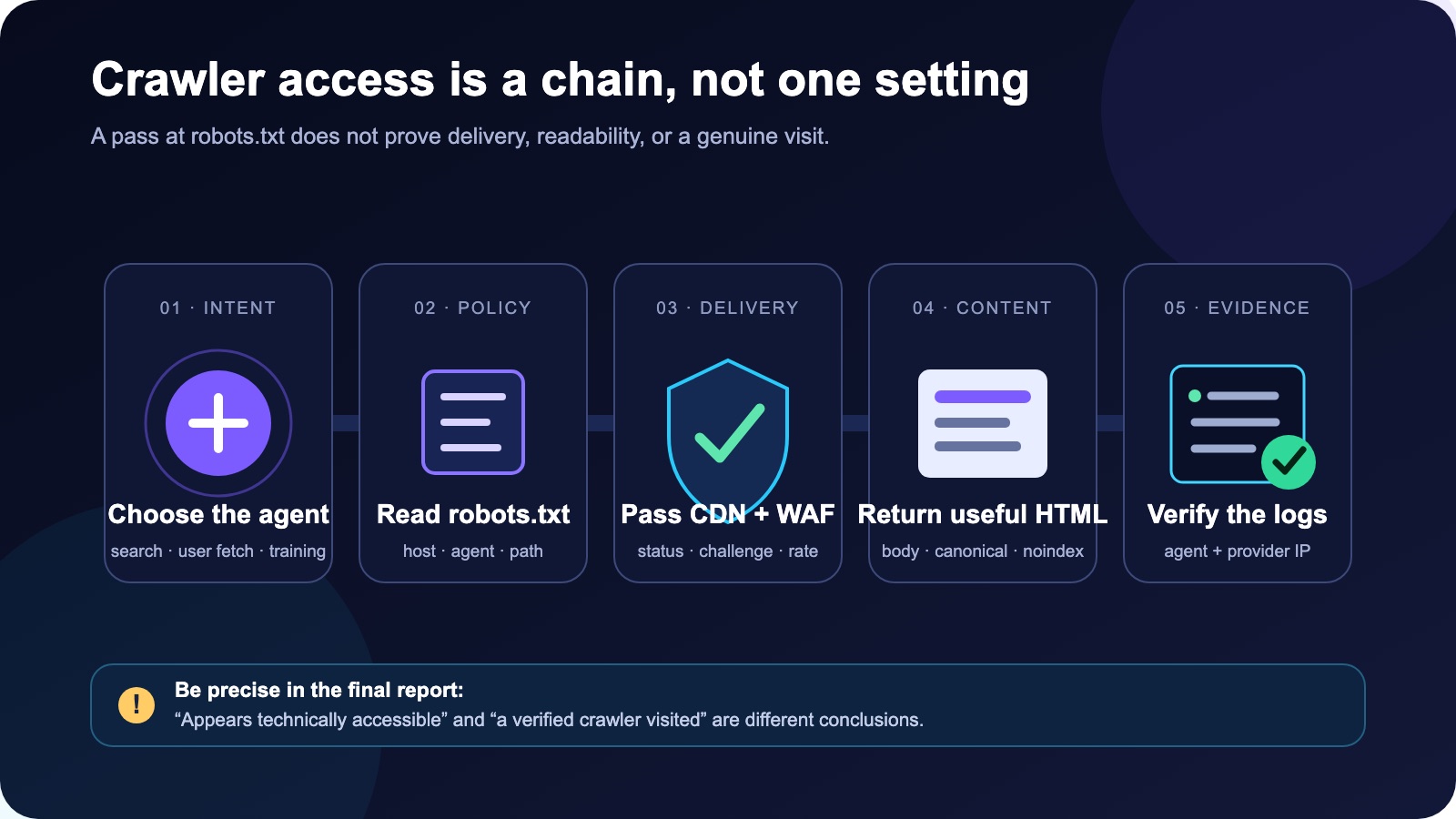
Crawler access is a chain. Passing one check does not prove the next one.
Do not begin with a list called "all AI bots." Begin with the action you want to allow or block.
OpenAI, for example, documents separate agents for separate jobs:
OAI-SearchBotsupports website discovery for ChatGPT search.GPTBotcollects content that may be used to improve foundation models.ChatGPT-Useris used for some visits triggered by a person in ChatGPT.
Those settings are independent. You can allow search while declining training.
Anthropic makes a similar split: Claude-SearchBot for search, ClaudeBot for potential model training, and Claude-User for user-directed retrieval. Perplexity separates PerplexityBot from Perplexity-User.
Google works differently. For AI Overviews and AI Mode in Google Search, the relevant crawler control is Googlebot. Google-Extended controls certain Gemini training and grounding uses. It is a robots token, not a separate HTTP user-agent, and it does not control inclusion or ranking in Google Search.
This distinction changes the configuration. A publisher may reasonably choose:
User-agent: OAI-SearchBot
Allow: /

User-agent: GPTBot
Disallow: /

User-agent: Claude-SearchBot
Allow: /

User-agent: ClaudeBot
Disallow: /

User-agent: PerplexityBot
Allow: /

User-agent: Googlebot
Allow: /
That is an example, not a universal recommendation. Review the current provider docs and your own data policy before shipping it.
Step 1: Test robots.txt as a real endpoint
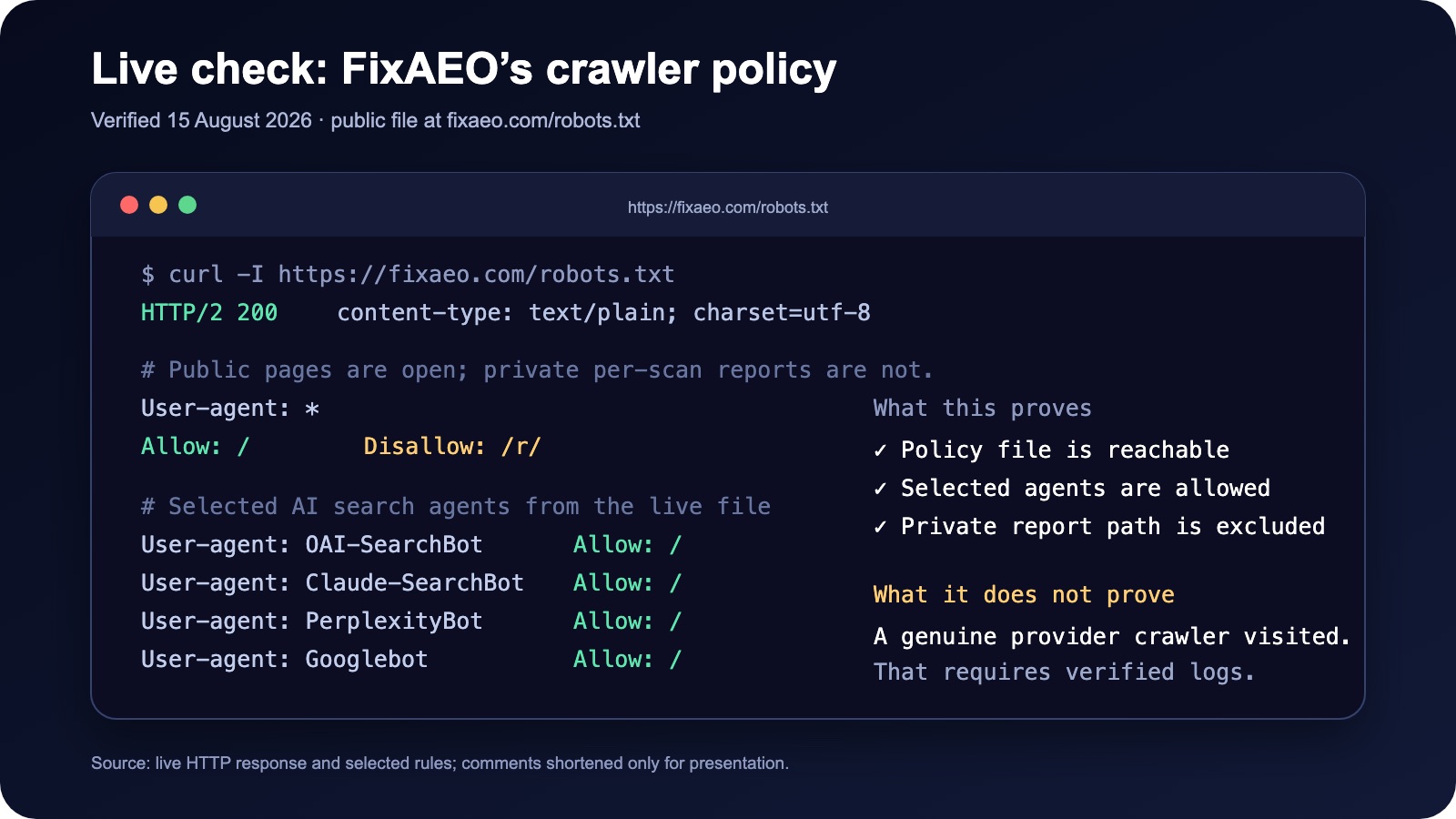
Selected rules from FixAEO's live policy file, verified on August 15, 2026.
Start with the exact host:
curl -L -D - https://example.com/robots.txt -o /tmp/robots.txt
I check four things:
- The final status is successful.
- The response is plain text, not an HTML error page.
- The relevant bot group allows the page path.
- The same check has been made on each important subdomain.
The last point is easy to miss. example.com/robots.txt does not set policy for docs.example.com.
Also, robots.txt is not security. A blocked URL may still be public and discoverable through links. Put private data behind authentication instead of expecting a crawler preference to protect it.
When rules overlap, use a standards reference rather than guessing. Google's robots.txt specification explains the matching behavior it supports.
Step 2: Compare normal and crawler-labelled responses
I use a GET request here rather than relying only on HEAD, because some stacks handle the two methods differently.
Normal request:
curl -L -o /dev/null \
  -w 'status=%{http_code} type=%{content_type} bytes=%{size_download}\n' \
  https://example.com/page
Crawler-labelled request:
curl -L \
  -A 'PASTE_THE_CURRENT_OFFICIAL_USER_AGENT' \
  -o /dev/null \
  -w 'status=%{http_code} type=%{content_type} bytes=%{size_download}\n' \
  https://example.com/page
Use the full current string published by the provider. Versions change, so I do not hard-code one into long-lived internal documentation.
The main failure patterns are straightforward:
| Result | Likely place to investigate |
|---|---|
401 |
Authentication or access gateway |
403 |
WAF, bot protection, IP or region rule |
429 |
Rate limiting |
| Redirect loop | Host, HTTPS, locale, or cookie redirect logic |
200 with a tiny body |
Challenge page, consent wall, or empty app shell |
5xx |
Origin, proxy, edge function, or dependency failure |
Compare more than the status. If a browser request downloads 250 KB and the crawler-labelled request gets 4 KB, both may say 200 while returning different pages.
Compare the body, not only the byte count
Response size is a quick signal, but it can change because of a timestamp, experiment, or personalized header. When I need a cleaner comparison, I save both bodies and inspect them.
curl -sSL https://example.com/page -o /tmp/browser.html
curl -sSL -A 'OAI-SearchBot' https://example.com/page -o /tmp/crawler.html

wc -c /tmp/browser.html /tmp/crawler.html
shasum -a 256 /tmp/browser.html /tmp/crawler.html
Different hashes do not automatically mean a block. They tell me to look closer. I search both files for the page's H1, a sentence from the main answer, noindex, the canonical URL, and common challenge-page wording.
rg -i '<h1|canonical|noindex|captcha|challenge|checking your browser' \
  /tmp/browser.html /tmp/crawler.html
For this kind of local regression test, the short OAI-SearchBot label is enough to reveal rules based on the header. For a production verification, use OpenAI's current full user-agent string and verify genuine traffic by source IP.
A live example from FixAEO
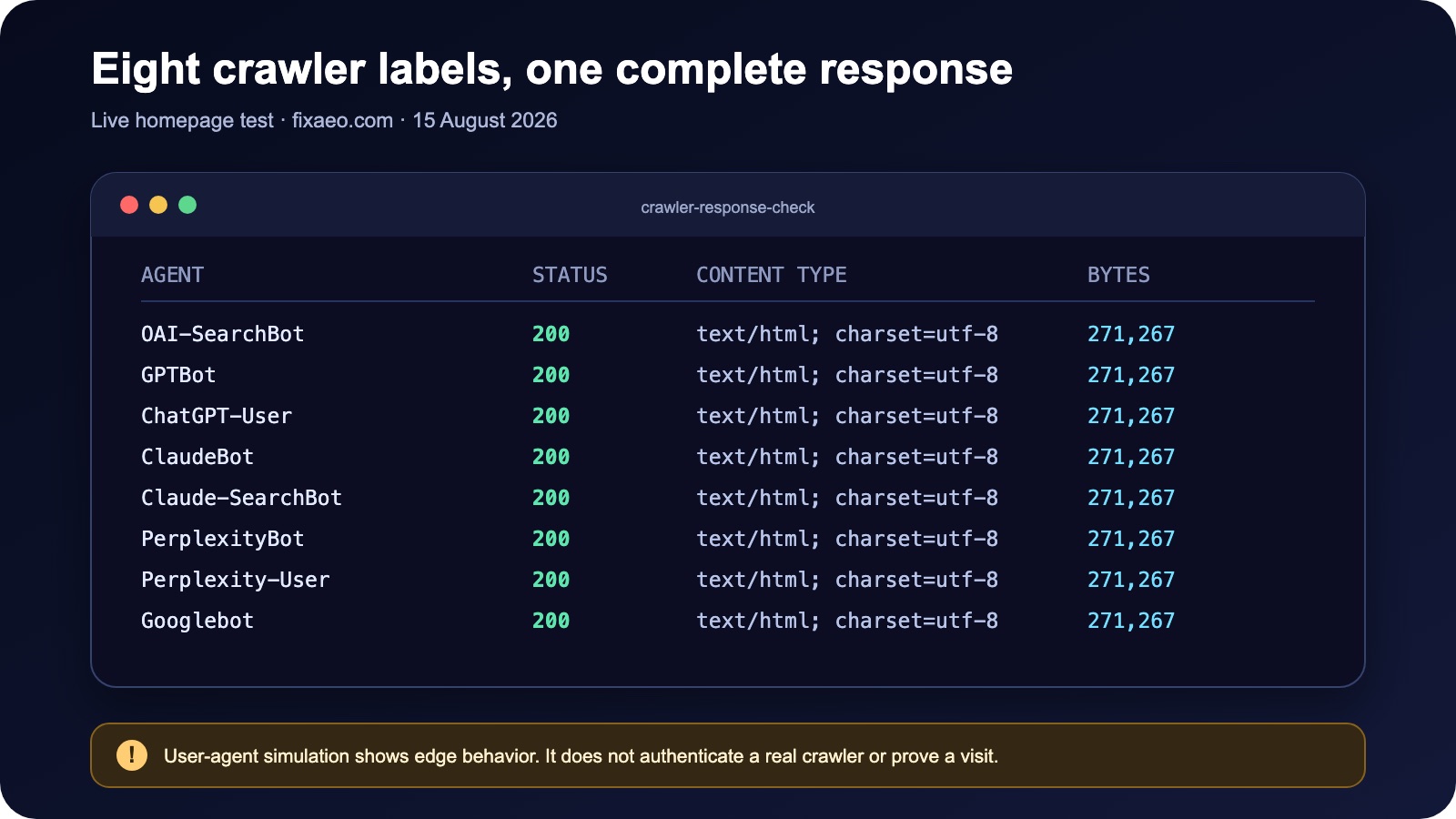
The response test checks edge behavior. It does not authenticate the requester.
Here is the reproducible test record:
| Test field | Value |
|---|---|
| Date | August 15, 2026 |
| Target | https://fixaeo.com/ and its robots.txt file |
| Request behavior | GET, redirects followed, no logged-in cookies |
| Measurements | Final status, content type, downloaded bytes |
| Limitation | A copied user-agent does not authenticate a provider crawler |
I ran this check on fixaeo.com on August 15, 2026. Its robots.txt returned 200 as plain text and allowed the search crawlers I expected. The private /r/ report path was disallowed.
I then requested the homepage with eight crawler labels, including OAI-SearchBot, Claude-SearchBot, PerplexityBot, and Googlebot. All eight tests returned status 200, text/html, and the same 271,267-byte response.
Useful? Yes. Proof of real crawler visits? No.
Anyone can send User-Agent: OAI-SearchBot. The test shows that my edge did not block a request carrying that label. It does not authenticate the requester.
Step 3: Inspect the layer in front of your app
The application may never see a blocked request. Check CDN and firewall events before changing application code.
I look for:
- Managed bot or browser-integrity rules
- JavaScript challenges
- CAPTCHA actions
- IP reputation blocks
- Country restrictions
- Request-rate thresholds
- Required cookies or session checks
OpenAI's crawler guidance warns that bot protection can return 403 even when robots.txt allows access. Perplexity's WAF guide recommends combining user-agent matching with the provider's published IP ranges.
That combination matters. A user-agent alone is trivial to spoof; an IP alone can become stale or be shared across behaviors. Use current provider data and whatever verified-bot feature your edge platform offers.
The cache can hide the real result
One cache issue is easy to miss: the first request can populate a cache, and later crawler-labelled requests may receive that cached response. Everything then looks identical even when the origin has user-agent-specific logic.
When the result feels suspicious, check cache headers such as Age, CF-Cache-Status, X-Cache, and Vary. Then repeat against a safe test URL with a harmless query string if your caching rules permit it. Do not add random cache-busting parameters to production URLs at scale.
Also check whether the application varies content by device, country, consent state, or cookie. A WAF may allow the request while middleware returns a location wall or empty shell. That is why I compare known text in the body rather than treating a matching status as success.
Official references:
- OpenAI crawlers and IP range links
- Anthropic's three crawler types and IP verification
- Perplexity crawler and WAF configuration
Step 4: Inspect the HTML, not only the screenshot
Modern web apps can look complete in a browser while returning almost none of the main content in the initial response.
Save the body and inspect what arrived:
curl -L https://example.com/page -o /tmp/page.html

rg -i '<title|canonical|robots|noindex|<h1' /tmp/page.html
I also search for a sentence that appears in the main content. If it is absent, the page may depend on client-side rendering or a second API request.
Review:
- The title and main heading
- Primary answer text
- Canonical URL
robotsand crawler-specific meta tagsX-Robots-Tagresponse headers- Links needed to discover related pages
- Login, consent, and region walls
Some crawlers render JavaScript; some fetchers do less. I avoid using Googlebot's rendering ability as the baseline for every AI system. The important information should be present in server-rendered HTML whenever practical.
For Google's AI features in Search, Google says normal Googlebot controls apply. Search Console's URL Inspection tool is the best place to see the HTML Google received.
After access is working, measure visibility as a separate stage. Google began rolling out generative AI performance reports in Search Console in June 2026. If your property has the report, use it to measure appearances in Google AI features; do not treat it as evidence about ChatGPT, Claude, or Perplexity.
Step 5: Use logs to separate "accessible" from "accessed"
This is the part that closes the loop.
Search CDN, load-balancer, or origin logs for the agent. For every match, capture:
timestamp
request path
status
bytes returned
source IP
user-agent
cache/WAF action
Then compare the IP with the provider's current published range. A matching user-agent and a verified source are much stronger evidence than either one alone.
I use two different statements in reports:
- Technically accessible: the policy, response, firewall, and HTML checks reveal no known barrier.
- Observed access: a verified crawler request appears in the logs.
Do not turn the first statement into the second. A provider may not have attempted a crawl yet.
A practical log check
The exact command depends on where your logs live. For a local Nginx-style access log, a first pass can be as simple as:
rg -i 'OAI-SearchBot|GPTBot|ChatGPT-User|ClaudeBot|Claude-SearchBot|PerplexityBot|Perplexity-User' \
  /var/log/nginx/access.log
I export matching rows rather than reading them only on screen. The export needs the timestamp, request path, status, bytes, source IP, user-agent, and edge action. Without the source IP, I cannot distinguish a provider crawler from someone copying its name.
Verification should use the provider's current published range. OpenAI, Anthropic, and Perplexity all link to current crawler IP data in their official documentation. I avoid pasting those ranges into code or an article because they can change. In a maintained system, fetch the provider data on a schedule or use your CDN's verified-bot program.
If there are no matching rows, I do not call that a failure immediately. The crawler may not have visited during the log-retention window. I report "no verified visit observed" and keep the access-test result separate.
Step 6: Add a crawler-access smoke test to CI
Crawler access can break after an innocent infrastructure change. A new bot rule, authentication middleware update, or redirect can change the response while the page still looks fine in a developer's browser.
For critical public templates, I use a small smoke test. This example checks status and confirms that a known phrase still appears in the body:
#!/usr/bin/env bash
set -euo pipefail

url="https://example.com/important-page"
expected="A sentence that must appear in the main content"
body="$(mktemp)"

trap 'rm -f "$body"' EXIT

for agent in OAI-SearchBot Claude-SearchBot PerplexityBot Googlebot; do
  status="$(curl -sSL --connect-timeout 10 --max-time 30 \
    -A "$agent" -o "$body" -w '%{http_code}' "$url")"

  if [[ "$status" != "200" ]]; then
    echo "$agent received HTTP $status"
    exit 1
  fi

  if ! rg -Fq "$expected" "$body"; then
    echo "$agent received HTTP 200 but the expected content was missing"
    exit 1
  fi

done
This is a regression check, not crawler authentication. It tells you whether your own edge treats those user-agent labels correctly. Real-bot verification still belongs in logs or a CDN feature that validates provider traffic.
I would run this test after deployment, not on every code commit. Four agents across five URLs already create 20 external requests. Keep the URL list small, respect your own rate limits, and avoid testing private or state-changing routes.
A compact test matrix
Do not test only the homepage. Pick one URL from each important template:
| Template | robots.txt | HTTP/body | WAF | HTML directives | Verified log |
|---|---|---|---|---|---|
| Homepage | |||||
| Article | |||||
| Product or feature | |||||
| Documentation | |||||
| Private/account path |
For the private row, the expected result is different: authentication should protect the content, and crawler policy should reflect that intent.
Repeat the matrix after changing a CDN, firewall, hosting platform, rendering framework, or authentication layer. Those changes can break access without touching robots.txt.
Common questions developers ask
Can ChatGPT crawl my website if GPTBot is blocked?
Potentially, yes. OpenAI separates GPTBot, which concerns potential model training, from OAI-SearchBot, which supports ChatGPT search. Check the OAI-SearchBot rule and live response independently. A GPTBot block does not by itself describe your ChatGPT search access policy.
Why does my AI crawler checker say "allowed" while the request gets 403?
The checker may parse only robots.txt. Your CDN, WAF, hosting security layer, or application can still reject the live request. Inspect security events for the exact URL and timestamp. Also compare the returned body because some challenges use status 200 instead of 403.
Should I use HEAD or GET to test an AI crawler?
Use GET for the meaningful test. Some applications and edge rules treat HEAD differently, and HEAD cannot show whether the response contains the main content. A HEAD request is useful for a quick header check, but it should not be your only crawler-access test.
Does a 200 response mean the page can be cited by ChatGPT or Perplexity?
No. It means the request received a successful HTTP response. Citation still depends on discovery, retrieval, content relevance, authority, and the system's answer-selection process. Confirm the body is useful, then track verified crawls and actual citations as separate signals.
How do I measure appearances in Google AI Overviews or AI Mode?
Use Search Console's generative AI performance report if it is available for your property, together with URL Inspection and the normal Performance report. Those reports describe Google visibility. They do not show whether OpenAI, Anthropic, or Perplexity fetched or cited the page.
Is llms.txt an alternative to robots.txt?
No. robots.txt expresses crawler permissions. llms.txt can offer a concise map of important content, but it does not bypass authentication, a WAF block, noindex, or missing server-rendered HTML. Fix the request path first; use llms.txt as an additional discovery aid.
How do I verify an AI bot user-agent is genuine?
Match the user-agent with the provider's current published IP ranges or use a verified-bot feature from your CDN. A copied agent name is not identity proof. Keep the IP data current, log the decision, and avoid broad firewall exceptions that could expose account or private-report paths.
Where automation helps
I built FixAEO's free AEO audit to automate the first pass across common crawler and page-level checks. It is useful for finding which path needs attention. I still use provider IP verification and server logs before claiming that a genuine crawler reached a site.
The short version: robots.txt answers whether a crawler is invited. The HTTP response, firewall, HTML, and logs tell you whether it can enter, read, and prove it was there.
About the author
Nitish Kumar Yadav is the founder of FixAEO. He works on technical answer engine optimization, AI crawler access, and measuring how brands appear in AI-generated answers. This article documents the access checks he runs before investigating mentions, citations, sentiment, or competitor share of voice.
Editorial and corrections note
The crawler identities, Google controls, provider links, and FixAEO response measurements in this article were rechecked on August 15, 2026. If a provider changes its policy or you find an error, email hello@fixaeo.com with the URL and evidence so the article can be corrected and reverified.